| Software Music Machine Archive |
|
Forte v3.2.20
|
|
Operating System:
File Size:
-
License:
License Conditions: Performer Edition Registration: US$149.95 or Producer Edition Registration: US$499.95 System Requirements: Minimum 1.5GHz, Multiple cores supported 1GB, DXi or VSTi soft-synth, Windows compatible MIDI input port, Windows ASIO or WDM compliant audio output device, 1024x768 resolution Last Updated: 2014-07-28
For more detail about software : Software Description
|
View Forte v3.2.20 Screenshot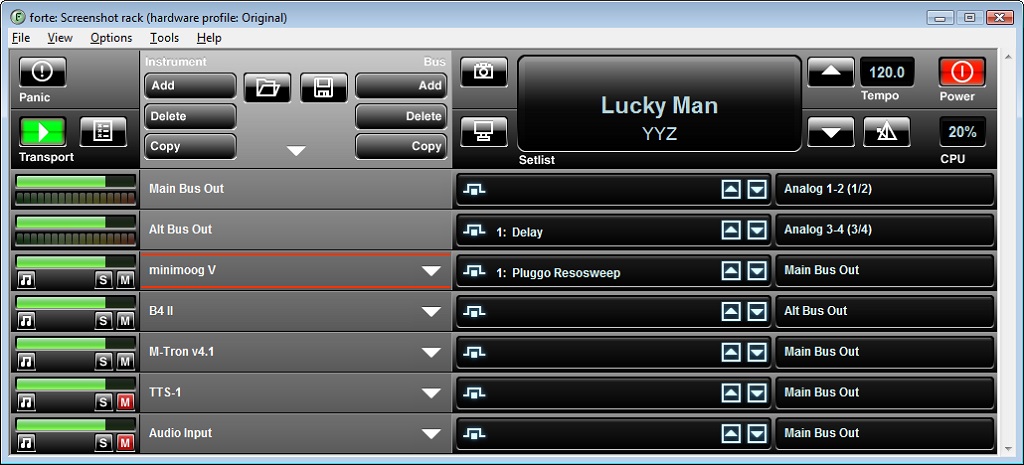 |
Software Description
Forte 2 is a live performance workstation for virtual instruments, offering more control and convenience than a traditional rack of hardware sound modules. forte is optimized for the stage, with low latency audio, vast MIDI routing capabilities, and unique live performance features.
Features:
- Low Latency Multiple Instrument Hosting: Play up to 32 virtual instruments live with mixing and routing to multiple audio outputs.
- Intuitive User Interface: If you've seen a rack of hardware sound modules, forte will look familiar to you
- Performance Automation: Recall virtual instruments settings and MIDI routing instantly with remote controlled "Scenes".
- Advanced MIDI Routing and Filtering:
- Flexible MIDI routing and filtering. Map any MIDI channel to one or more other channels, with each 'map' containing unique filtering and CC routing settings.
- MIDI control of audio effect plugins.
- MIDI Clock tempo synchronization.
- MIDI output from plugins is available as a virtual MIDI input to other plugins. - Audio Effects: Add audio effects to audio inputs, instruments or audio buss outputs. MIDI control of effect parameters.
- Audio Thru: Using the brainspawn Audio Input plugin, process live audio input through audio effects with very low latency.
- Virtual Set List: Configurable SceneView displays the set of upcoming Songs/Scenes in large font, multiple line Scene descriptions for storing notes per-Scene, and can display a custom background picture per-Scene, allowing elaborate 'cheat' sheets to be displayed per-Scene.
- No-Touch Features: auto-start on boot up, auto-recovery, remote control, SceneView and other features eliminate the need to use the keyboard and mouse during performance.
- Control Surface Support: Control your performance with Frontier Design TranzPort or Mackie Control. Even define your own control surfaces for powerful customizations.
- Easily Adapt to Changing Hardware: A powerful wizard helps you load a rack on different hardware when your rig changes.
Forte 2 is available in two editions:
- Performer Edition provides everything you need to play VST instruments on stage.
- Producer Edition provides additional features to enable moving between multiple computers and different hardware setups. Producer Edition includes EHCo for MIDI output and a site license for multi-computer installation.
New in v3.2.20
- New OPTIONS.INI option for creating custom set order index starting point.
- Automatic condense of set item name in main console window for strings that are too long.
- Bugfix for problem where Forte UI jumped in front of SceneView on scene change.
- Bugfix for MIDI filters in existing scenes when importing new scenes into a rack file.
- Bugfix for Frontier Tranzport scene display on.
New in v2.2.6
- Fixed the "global" behavior of plugin disconnect scene command.
- Show scenes in order in rack editor.
- Fixed MIDI input for Spectrasonics Omnisphere and some other VST 2.4 plugins.
- Reduced the verbosity of the rack load process if running Forte in an Remote Desktop session - speeds up rack load.
- Resizable and Maximizable Plugin Manager.
- Fixed problem with crash when trying to initialize a non-existent VST plugin DLL.
- Fixed crash on exit with VMI instruments.
- Added instrument channel mute to instruments in the rack editor.
- Added a "full rescan" option to the plugin manager (clear and rescan). Renamed the existing plugin manager scan to "Quick Scan".
