| Software Music Machine Archive |
|
Reaper 5.03
|
|
Operating System:
File Size:
11 MB
License:
License Conditions: Evaluation period: 60 days. Registration: US$60 for Private Use - US$225.00 for Commercial Use System Requirements: Mac OS X 10.4 or 10.5, PPC or Intel (Intel recommended). Last Updated: 2015-10-05
For more detail about software : Software Description
|
View Reaper 5.03 Screenshot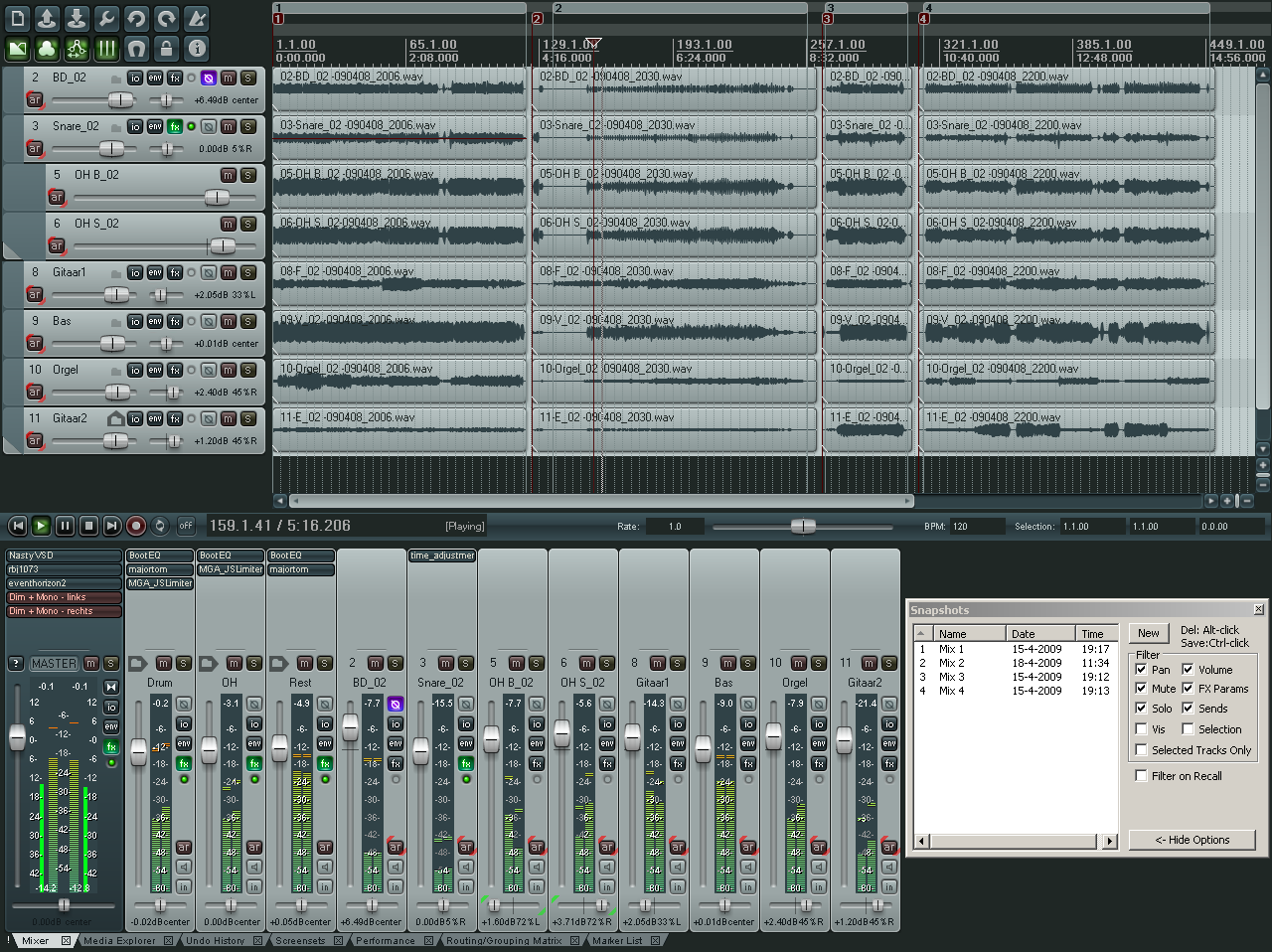 |
Software Description
Featured in Hitsquad's recommended list of the best DAW Software
Cockos REAPER is a Mac application that is designed for the arrangement, recording, mixing, editing and rendering of audio. It has a tweak able and easy to use control interface that will be easy for amateurs and has enough depth and variations for professionals.
REAPER is designed to help Mac users work quickly and creatively, without any artificial limits on what users can do. REAPER may feel lacking because it dos not have busses, track types, tools, or offline processing. Still any track can be a bus, track channels can be sent wherever the user prefers. Drag from one track to another. Sidechaining is also easy by draging a send from its source to a target, then selecting a plug-in to sidechain.
Since Cockos REAPER for OS X doesn't have track types, Mac users can utilize audio gates to write triggers on the same track. Users can render a virtual MIDI instrument into audio as a new take. Users can insert MIDI track control options anywhere in the signal chain, like to control MIDI pan (or anything else) both downstream and upstream of a MIDI plugin.
Every item has their own controls for snap points, fades, volume, per-take FX, and more, so users can work intuitively without having to switch tools or keeping track of what mode the mouse is in. Users can vertically and visually arrange any number of items within a single track. This allows for control on how the items crossfade and mix together. All processing and changes are non-destructive.
Cockos app - REAPER has an intuitive yet sophisticated branching undo system. This allows users to work with creativity and confidence, users can get back to a prior state with just a mouse click. REAPER from Cockos even tracks user actions right in the title bar so users can see what changes where made.
Plug-in bridging and firewalling via it Native VST, allows users to run REAPER x64 with Win32 plug-ins.
Basic Features:
- Support for an unlimited number of audio tracks.
- Audio tracks are all fully routable (multiple inputs, outputs).
- Volume, pan controls and envelopes per track.
- Supports audio processing plug-ins (DirectX, DXi, VST, VSTi, and Jesusonic) with automation, easy chain manipulation and editing.
- Pitch shifting and time stretching.
- Fast, reasonable and usable Windows-style UI, working well on both low and high resolutions or multiple monitors.
- ASIO, Kernel Streaming, WaveOut, and DirectSound support for playback and recording.
- Reads WAV, OGG, MP3 and MIDI files, records WAV and MIDI files.
- Can render to WAV, OGG, MP3 if lame is installed.
- Full SMP support (can utilize 2 or more processors).
- Multi-layer undo/redo support.
- User creatable color themes.
Advanced Features:
- Unlimited send/receives per track, with configurable parameters (pre-fx, post-fx, volume/pan adjustment/envelopes, mix to mono, phase, etc.).
- Any track can act as a bus, for routing flexibility.
- Tracks can have one or more (mono or stereo) hardware sends, for analog mixing capability.
- Fully routable/FX-able folder tracks that can contain group tracks.
- Item grouping.
- Ripple editing.
- Grid/snap support with configurable options.
- Markers.
- Unlimited takes per media item.
- Auto punch-in/punch-out functionality.
- Automatic record monitoring modes.
- Selection length granularity options as well as grid snapping.
- Tempo envelope (for grid lines/snapping/ruler), play-speed envelope.
- Project consolidation/export options (for rendering all or parts of any number of tracks to WAV, etc.).
- A UI and architecture that allows you to easily cut loops of many tracks simultaneously, without having to write them to disk.
- Support for plug-in generated media (such as click tracks, etc.).
- Project tempo envelopes for variable tempos in track, grid/snapping that supports variable tempos.
- 64-bit floating point sample pipeline for high quality.
- Advanced recording and monitoring options; examples:
- You can route multiple tracks (inputs and/or media items) into a bus, and record THAT mixed down version.
- You can record the input signal, or record the post-FX, post-track-render signal.
- You can switch recording sources on the fly, even while recording.
- You can arm/disarm tracks' inputs while playing or recording.
Other Features:
- Human readable, human editable, backwards and forwards compatible project file format.
- Options to build peaks for recorded files on the fly.
- Lots of control for the user to specify where recorded files go, etc., when dealing with many projects.
- Template support to make it easy to load a project template and save it as a new project when you begin.
- Input/output channel name aliasing (why view your inputs as "MOTU 896: Analog 1" when you could have them be "Vocal Mic", etc.).
- Options for automatically backing up project files to alternate paths, time-stamped versions, etc.
Related Music Production Equipment:
Roundup of the best cheap USB Microphones
DAW Controller
To record audio you will need an Audio Interface: See our review of USB Audio Interfaces here.
New in v5.0.3
- Bugfix for various small issues with LFO's
- Bugfix for functional and cosmetical problems with serial number text edit box
- Bugfix for added support for additional sound sets
New in v5
- Major performance and workflow improvements
- Multiple bugfixes
New in v4.77
- Support for naming sliderXY variables via @sliderx:varname=defval<... syntax
- support for MIDI/OSC action binding
- Improved project tab support for FX
- Improved FX envelope panel undo behavior
- Trim behind mode better handles exactly-overlapping items
- Bugfix for last touched parameter when skipping sliders .
- Bugfix for potential crash with bad timestamps .
- Bugfix for fixed encoding of linear tempo changes in exported MIDI .mid file writing fixed when ticks per QN is configured higher than 64k
- Bugfix for track icon alignment setting .
- Bugfix for setting of no track grouping indicator .
- Bugfix for screenset issues with input FX and hardware FX
- Bugfix for potential for invalid output in certain but rare fades
- Bugfix for start offset adjustment when using take playrates
- Bugfix for hide/restore of input FX windows on tab switch
- Bugfix for invalid render directories/filenames in certain instances .
- Bugfix for moving items with other locked items at same position .
- Bugfix for incorrect latency reporting when changing pin connections
New in v4.73
- Added the elastique v3 pitch shift/timestretch engine.
- Improved Undo for duplicate actions
- Optimized disk writing buffers
- Improved handling of certain low-level mono signals
- Bugfix to extreme stretch logic.
- Bugfix for MIDI Learn
- Various other bugfixes
New in v4.721
- Bugfix for chat window crash on OSX .
- Bugfix for GetSetTrackSendInfo() UI refresh issues .
- Bugfix for toggle states of Humanize/Transpose notes actions
- Bugfix for chat window crash on OSX .
- Bugfix for marker visibility bugs when using take playrates
- Reduced excessive audio locking from many less-often-used actions
- Do not block audio threads when closing/reinitializing MIDI devices
- Reduced excessive locking in track envelope window
- Unfreeze no longer blocks audio from other projects
- Faster performance when using many tracks that are not visible in track list
- Faster/smoother updating when vertical zooming arrange view
- Faster changing of mode for large track counts
- Bugfix for multiple undo points being added when toggling setting
- Bugfix for possible crash when removing take envelopes
- Pitch envelopes that are inactive are properly ignored (and do not use pitch shifting)
- Various other bugfixes and improvements
New in v4.7
- Audio Unit compatibility improved
- Enhanced graphics performance on OSX 10.7+
- Restore Project Tabs when restarting Reaper
- Improved performance when working with large track, marker, and region counts
- Various other fixes and improvements, changelog details here
New in v4.62
- Plugin extensions can register MIDI/OSC learn-able actions .
- Plugin extensions can register actions in any section .
- Plugin extensions can register toggle actions in any section
- Bugfix for RenderFileSection() return value
- Bugfix for directory issues .
- Bugfix for Screensets/Layouts shortcut issues
- Allowed localization of toolbar names
- Various other fixes and enhancements
New in v4.611
- Bugfix for MIDI Editor
- Bugfix for encoding of certain strings with quotes in them (group and comp names).
- Bugfix for decoding of certain (rare) strings.
- Bugfix for GetToggleCommandState2 to work with other sections.
- Bugfix for MIDI text/sysex event get/set support.
- Bugfix for MIDI_SetTextSysexEvt and MIDI_GetTextSysexEvt
- Bugfix for potential crash on exit introduced in 4.61.
- Bugfix for potential UI hang with linear tempo transitions on Win64.
- Bugfix for move segment preserving end values with square points.
- Keyboard shortcut to replace FX preserving routing changed from R to Ctrl+R.
- Bugfix for random noise being possible for unlooped items with negative start offsets.
- Bugfix for JSFX: gfx_arc() drawing
- About box now has option to show only personal or small business use in titlebar for this license type.
- Memory mapped peak files are off by default to save address space/better deal with lost disks.
- Added new (default) option to use audio device reported latency rather than relying solely on ping tests.
- Faster saving, faster loading.
- Bugfix for routing window visual alignment
- No longer unload plug-ins DLLs on exit.
New in v4.61
- Bugfix for OS X 10.4 top level menus
- Performance improvements and optimizations
- MIDI CC Chase bugfix
- Stability improvements and other bugfixes
- Various other enhancements, here
New in v4.602
- Improved ReaScript support including built-in EEL language
- Improved JS functionality, keyboard support
- New JS step sequencer
- MIDI editor filter and selection improvements
- ReaVerb impulse spectrographs
- Various other fixes and optimizations
New in v4.459
- Bugfix for sizing issue on OSX .
- Bugfix for velocity lane editing on OSX .
- Bugfix for peakbuilding when changing samples via combo box
- Various other improvements and bugfixes - details here
New in v4.457
- Fixes for OSX Mavericks, App Nap auto-disabling support
- Enhanced bridged AU plug-in support
- Better MIDI peaks displays in arrange view
- Better inline MIDI editor behavior
- Improved OSC receiving support (actions with values, MIDI, better soft takeover support, etc)
- And more!
New in v4.456
- Better multi-channel track performance for AU and JS plug-ins
- Improved FX drag-and-drop behavior
- Fix for SMPTE LTC generation/sync
- Render improvements for stems/project regions
- Various other bugfixes and improvements
Changes in v4.454
- MIDI editor multicontext refinements
- Enhanced MIDI import/export
- Improved JSFX scripting
- Various bugfixes and plug-in related optimizations
Changes in v4.402
- Bugfix for incorrect volume blip when adding sends
- Bugfix for some potential crashes when removing tracks and sends
Changes in v4.33
- Improved video support including WEBM encoding/decoding
- Big improvements on Project Bay (various bugfixes and improved memory efficiency)
- More bugfixes and enhancements
Changes in v4.32
- fixed play cursor artifacts with retina displays.
- new faster CoreText rendering used on 10.5+, more consistent text.
- now linked against 10.5 SDK, but with 10.4 compatibility.
- option to ignore CoreAudio reset messages (can enable for certain devices, emulates 4.22 behavior).
- mouseover highlight of current position.
- improved functionality with click/drag to change multiple tracks.
- show MIDI inputs and outputs.
- improved display of MIDI-only sends.
- option (default) to clear automutes on playback start.
- improved updating of arrange when automuting.
- improved new 4.30 fade shape behavior with fully overlapping items.
- avoid creating tiny media items when pencil-drawing with snap enabled.
- improved linear painting in drum modes.
- fixed overdub+autopunch+preroll bug [issueid=4046].
- allow pasting of MIDI events directly in arrange view (adds item, or pastes in existing item).
- fixed incorrect transition from mono to stereo signals with stereo impulses.
- corrected latency immediately after samplerate change.
- improved layout when using large fonts on Windows.
- fixed parent channel not repopulating after adding sends.
- FX browser: optional alternate tree/list layout (doubleclick divider to change).
- ReaStream: added localhost support for win32, improved broadcast support on OS X, improved recent host history.
- Time signatures: fixed adjusting media items when changing time signature numerator.
- added preliminary VLC support for video playback
- added YV12 colorspace support for OS X
- improved bridged-quicktime behavior with mp3 audio (ignores audio rather than crashing).
Changes in v4.21
- Bugfix and improvement for control surfaces
- Bugfix for OSC
- Bugfix for recording and improved latency
- Added actions to insert time and paste items
- Cue ensures correct rendering of .wav files
- Bugfix for MIDI pools
- Bugfix for Project bay autoretain
- ReaScript/API export added
- Transient detection changes
Changes in v4.31
- MIDI improvements
- Bugfix and improvement for Crossfade editor
- Changes with the Mouse modifiers:
- Changes with Cursors behaviors
- Various other bugfixes and enhancements, details here
Changes in v4.13
- fixed linked framework versioning for certain plug-ins on Lion
- tweaked startup sequence to avoid stalling after scanning VSTs that have UI on scan
- special case for iZotope Trash VST UI not working
- fixed effSetSpeakerArrangement on bridged plug-ins
Changes in v4.02
- Pointer updates:
- New features for restore and marquee zoom, scrub/jog behavior, browser scroll,
- Existing configurations are properly saved
- Assigning mouse click to actions behave properly
- Ctrl+right-click makes a time selection just like in ver 3.xx
- Other mouse or pointer improvements.
- Now shows an error message when users move or copy a file to a target where the same file exists.
- Allows track listing by name.
- Project bay updates:
- File resolving is used when loading retained items.
- MIDI editor
- Accidental time selections in ruler can now be avoided.
- horizontal zoom is now working properly with mouse cursor center, while using timebase that is project-synced.
- Resolved problems when drawing over CC events with snap enabled
- Negative swing quantize is supported
- Envelopes Updates:
- Clicking on an envelope point works properly
- Transition point can now be added when recording automation while there is no playback.
- Initial envelope is editable regardless of editing preferences
- MIDI:
- Renaming a pooled take now renames the other pooled takes.
- No more stuck notes during looping.
- More bugfixes and updates are available at the Reaper page.
Changes in v3.74
- VST:
more handling for VSTs that resize themselves
fixed window sizing bug causing some FX to open in a too-small window
Actions: fixed loop length halve/double actions - API: fixed support for modifying very short items via certain API functions
- Master track: channel count now reset on new project, able to save in project defaults
- MIDI editor bank/program select: don't sort program banks alphabetically
- MIDI recording: prevent dropped notes in MIDI replace record mode
- Mixer: fx parameter scroll button positioning fixes
- Nudge/set: fixed bug when duplicating grouped items
- OSX: Better performance when updating arrange view while bringing media online
- Project templates: default project template is now stored with relative path in .ini (for config import/export, portable installs)
- ReaControlMIDI: fixed manual text entry of pitch and pan values
- Stability: various small potential memory corruption fixes (thanks, nitpicker!)
- Track locking: fixed unlocking of track not adding undo state
- WINE support: properly detect newer versions of WINE
Changes in REAPER 3.72:
- MIDI editor:
moving CCs/events now updates pre-quantized positions
reduced memory use when opening/closing many editors
fixed memory leak when reusing MIDI editor and switching between MIDI items
fixed stuck velocity display on reopening some MIDI editors - API/ReaScript:
added SetMediaItemPosition/Length, with the option to suppress screen redraw
better portability between Windows and Mac (strip Windows newlines)
API functions for item/marker setting should now perform better on OSX - Armed actions:
show special cursor and tooltip only when clicking will trigger the action
do not cancel armed action on undo - Feedback routing:
fixed stopped monitoring with feedback
decreased memory/CPU use - Media items:
disabled "copy loop of selected area" action for MIDI items
recalculate autocrossfades for beat-based media items when changing time signature
allow copying loop of selected area when the time selection includes the item end - Shift+click item selection:
now use range of clicks rather than range of items
no longer unselects other items (hold ctrl in addition for this)
respects option to select all grouped items - MIDI recording: fixed some overlapping note issues with replace and overdub recording modes
- OGG support: improved stability/playback of corrupted OGG files (libvorbis 1.3.1 bug)
- Performance: Reduced thread locking when recalculating item information
- Shift+click time selection: on now obeys edit cursor moving preferences
- Stability: Improved MIDI note previewing threadsafety
- VST: better resize notification support
Changes in REAPER 3.71:
- ASIO: requested audio block size: fixed power-of-two rounding mode
- Media items: drawing fix for empty items
- Arc/roundrect drawing: fixed bugs, smaller code
- ASIO: support for requesting audio block size (many drivers will ignore, though)
- Floating toolbar: fixed refresh on update of theme
- MIDI editor: avoid unsafe memory access on undo
- Themes: fixed drawing glitch on docker tabs (and potentially elsewhere) introduced in 3.69

Problems
Every time I try to push the FX button on my track (I assume thats how I access the plug-ins?) the app crashes. I can record fine, but then i click FX and whammo! I normally use DP5 but i was having problems with one plug in and as process of elimination, I decided to try this app. I am using Mac OS X (10.4) and a G5 quad. I run Multiple music apps, tons of plug-ins, etc. with no issues in DP5 and Reason and IK synths and Kore etc. I cant get around this. Help!
Re: Problems
You could try posting your problem on the Reaper OSX Forum (http://forum.cockos.com/forumdisplay.php?f=34)