| Software Music Machine Archive |
|
Airfoil v5.1.0
|
|
Operating System:
File Size:
9.5 MB
License:
License Conditions: In demo noise is overlaid on all transmissions longer than 10 minutes. Registration: US$25.00 System Requirements: VST host application. Mac OS X 10.7 and up Last Updated: 2016-06-06
For more detail about software : Software Description
|
View Airfoil v5.1.0 Screenshot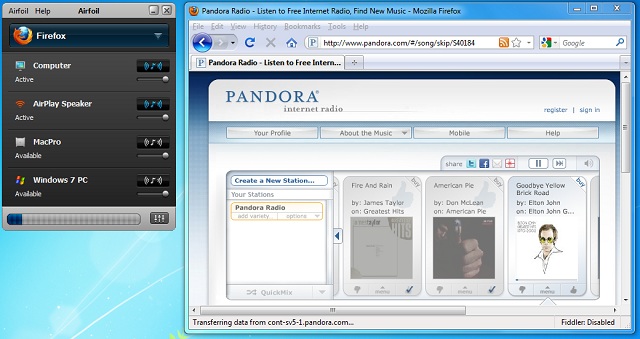 |
Software Description
Airfoil lets you send any audio to remote speakers attached to your AirPort Express. AirPort Express - It's not just for iTunes anymore.
With Airfoil, you can send audio from any application to your AirPort Express in just three easy steps.
Step 1) Select the application whose audio you want to transmit, in the Audio Source area.
Step 2) Select the desired AirPort Express device from the Remote Speakers list.
Step 3) Click Transmit. That's it!
Once you do this, any audio from the audio source will play out through your remote speakers. Use Airfoil to play audio from RealPlayer, Windows Media Player, Safari, and almost any other application right through your AirPort Express. Give your audio wings, with Airfoil.
Related Music Production Equipment:
Check out our report on Cheap Studio Monitors for home recording & mixing.
New in v5.1.0
- Improved Effects window design.
- Updated Instant On to ver. 8.2.6
- Retina quality album artwork
- Minor visual improvements
- Various other enhancements
- Multiple bugfixes
New in v5.0.2
- Better handling of sync adjustments in the “Advanced Speaker Options” window.
- Airfoil Satellite now avoids audio and networking issues caused by App Nap.
- Bugfix for an issue where sync adjustments for the “Computer” output were forgotten has been fixed.
- Bugfix for Airfoil not de-selecting the defunct Airfoil Video Player app if it's selected from a previous version.
- Bugfix for showing a warning when an active Bluetooth speaker disconnects from your Mac.
New in v5.0.1
- Minor Enhancement: Airfoil's main window will now show as many speakers as your screen height allows before adding a scroll bar.
- Bug Fix: A crash related to offline speakers in the Groups tab of the Preferences window has been fixed.
New in v4.9
- Updated instant On component to version 8.1.1, with support for Mac OS X 10.11 (El Capitan).
- More reliable fetching of album artwork from iTunes
- The menu bar icons for Airfoil and Airfoil Speakers have been updated for Retina.
- General support for the forthcoming Apple TV (4th generation).
- Bugfix for A/V sync with EyeTV
- Various other minor fixes and improvements
- Now requires Mac OS X 10.9 (Mavericks) or higher.
New in v4.8.7
- Initial compatibility with Mac OS X 10.10 (Yosemite).
- Updated Instant On to version 8
- Airfoil can now capture track titles (but not artwork) from Megaseg.
- Removed automatic Intermission menu, instead use the "System Audio" source.
- Bugfix for hanging on Mac OS X 10.9 (Mavericks) when the display is asleep.
- Code-signing is now checked during software update.
- Various other bugfixes
New in v4.8.5
- Control Airfoil from any iOS device with Airfoil Remote
- Vox and Ecoute are now supported for enhanced metadata and remote control.
- The Instant On component has been updated to version 7.2, with improvements in latency and other fixes.
- Capturing audio from applications which are pulling from audio devices should now have much lower latency.
- Bugfix for Safari audio capture fail on non-English systems has been fixed.
- Airfoil now fully prevents itself from ever being selected as a source.
- We disabled erroneous editing in the mailing list window.
- Various other bugfixes
New in v4.8.1
- Airfoil once again has full compatibility for sending to the Apple TV running software version 6.0. Hooray!
- Airfoil now offers easy selection of Intermission as a source, from the System Audio section of the audio source selection menu.
- The Instant On component has been updated to version 6.0.4. Several small updates were made
- Previously, when it was being installed, Intermission could cause Airfoil's Computer output to stop playing audio temporarily. We've cured that.
- The License window has been overhauled, with HTML. Neat!
- We've fixed a goofy bug where CPU usage would grow when silence (silence!) was transmitted while a custom EQ setting was active.
- Several other small bugs have been fixed.
New in v4.8
- Use your iOS device to remote control Airfoil
- Supports Last.fm and Radium 3 for enhanced metadata and remote control.
- Updated Instant On to 6.0.3 to fix various issues
- Requires Mac OSX 10.7 and up
- New Slider labels
- Shairport4W password authorization.
- Improved Airfoil Speakers
- The unlicensed noise alert now appears on the screen even when Airfoil is in menu bar only mode.
- Various other bugfixes
New in v4.7.4
- Full support for Airfoil Speakers for Android.
- Bugfix for a crash which could occur when selecting "Show Airfoil Only in the Menu Bar" in Preferences
- Airfoil Speakers has been updated for improved support in receiving audio sent by Apple TVs running version 5.1 or higher.
- Various other bug fixes have been made.
New in v4.7.3
- Full support for receiving audio from iOS 6, including metadata support
- Bugfix for an issue which caused a discolored stripe at the bottom of Airfoil's main window
- Improved software update process, with automatic downloads and install on quit
- Bugfix for an Airfoil Video Player crash on Mac OS X 10.8.2
- The Instant On component has been updated to version 6.0.2, fixing several small issues
- Audio from the WebKit application can now be captured on Mac OS X 10.8
- The Welcome Windows for Airfoil, Airfoil Speakers, and Airfoil Video Player have been removed and replaced with manual pages
- Airfoil Video Player now provides a more informative error when the computer is missing a DVD drive
- Various other small bug fixes have been made.
New in v4.7.2
- Audio capture of Safari, QuickTime Player, FaceTime, and Messages is now possible on Mac OS X 10.8 (Mountain Lion)
- Updated Instant On component to 6.0.1 which supports OS X 10.8
- Bugfix for Volume control issues with 3rd party AirPlay hardware
- Several fixes for Retina MacBooks Pro
- The Welcome Window size on Retina machines has been corrected.
- Applications are now prevented from incorrectly appearing twice in the Source list.
- Bugfix for Video Player's "Enter Full Screen" menu item
- The obsolete "Advanced Source Settings" menu item has been removed.
- Factory Reset fixed to work with Mountain Lion OS X
- Airfoil is now signed as part of Apple's Developer ID program
- Various other bugfixes
New in v4.7.1
- Airfoil's Menu Bar Mode now offers a source selector.
- The Instant On component has been updated to version 6, with improvements to System Audio capture and more. This update also includes preliminary
- support for Mac OS X 10.8.
- Sonora is now supported for enhanced metadata and remote control.
- Airfoil 4.7.1 offers full support for the new dual-band AirPort Express.
- Support for the iHome iW2 has been improved, allowing for remote volume control.
- Volume control for Spotify has been fixed.
- For maximum compatibility, the Instant On component is now required for capturing audio from apps made by Fluid.
- On Mac OS X 10.8, the Instant On component is now required for audio capture from Safari and QuickTime Player.
- A bug caused by Mac OS X 10.7 (Lion) which prevented AppleTVs from appearing after the Mac went to sleep has been worked around.
- The "Silence Output" in the Local Audio preference has been removed.
- The correct computer icon is now shown for 11-inch MacBook Air.
- Airfoil now includes the in-window Trial Mode badge.
- Airfoil now has a one-time sign-up for the Rogue Amoeba mailing list.
- Some issues caused by Mac OS X 10.8 (Mountain Lion) have been corrected.
- The loading of the Perian plugin by Airfoil Video Player has been fixed.
- Several other minor problems have also been fixed.
New in v3.5.2
- A rare deadlock with Instant Hijack has been fixed, with Instant Hijack 2.2.7
- Other rare deadlocks in Airfoil have been fixed.
- Airfoil Video Player no longer incorrectly appears in the Applications section of the source popup.
- An erroneous 5406 error has been suppressed.
- Airfoil Speakers will now disconnect when its machine is sleeping, so it will be available to take new connections immediately upon wake.
- Overdrive on the Effects window gain control now works properly.
- Airfoil no longer delays sleep.
